
User's Manual



Chapter 16 Quality of Service (QoS)
P-660HW-Tx v3 Series User’s Guide
262
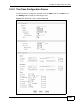
See Appendix E on page 411 for a list of commonly-used services. The following
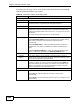
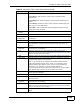
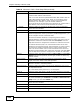
table describes the labels in this screen.
Table 76 Advanced > QoS > Class Setup: Edit
LABEL DESCRIPTION
Class Configuration
Active Select the check box to enable this classifier.
Name The text may consist of up to 20 letters, numerals and any printable
character found on a typical English language keyboard.
Interface Select from which interface traffic of this class should come.
Priority Select a priority level (between 0 and 7) or select Auto to have the
ZyXEL Device map the matched traffic to a queue according to the
internal QoS mapping table. See Section 16.5.4 on page 267 for more
information.
"0" is the lowest priority level and "7" is the highest.
Routing Policy Select the next hop to which traffic of this class should be forwarded.
Select By Routing Table to have the ZyXEL Device use the routing
table to find a next hop and forward the matched packets
automatically.
Select To WAN Index to route the matched packets through the
specified PVC. This option is available only when the WAN type is
ADSL.
Select To Gateway Address to route the matched packets to the
router or switch you specified in the Gateway Address field.
WAN Index Select a PVC index number.
Gateway
Address
Enter the IP address of the gateway, which should be a router or
switch on the same segment as the ZyXEL Device’s interface(s), that
can forward the packet to the destination.
Order This shows the ordering number of this classifier. Select an existing
number for where you want to put this classifier and click Apply to
move the classifier to the number you selected. For example, if you
select 2, the classifier you are moving becomes number 2 and the
previous classifier 2 gets pushed down one.
Tag Configuration
DSCP Value Select Same to keep the DSCP fields in the packets.
Select Auto to map the DSCP value to 802.1 priority level
automatically.
Select Mark to set the DSCP field with the value you configure in the
field provided.