
User's Manual



Chapter 17 Dynamic DNS Setup
P-660HW-Tx v3 Series User’s Guide
270
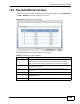
17.2 The Dynamic DNS Screen
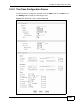
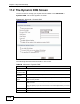
Use this screen to change your ZyXEL Device’s DDNS. Click Advanced >
Dynamic DNS. The screen appears as shown.
Figure 116 Advanced > Dynamic DNS
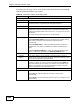
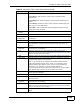
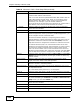
The following table describes the fields in this screen.
Table 80 Advanced > Dynamic DNS
LABEL DESCRIPTION
Dynamic DNS Setup
Active
Dynamic DNS
Select this check box to use dynamic DNS.
Service
Provider
This is the name of your Dynamic DNS service provider.
Dynamic DNS
Type
Select the type of service that you are registered for from your Dynamic
DNS service provider.
Host Name Type the domain name assigned to your ZyXEL Device by your Dynamic
DNS provider.
You can specify up to two host names in the field separated by a comma
(",").
User Name Type your user name.
Password Type the password assigned to you.