
User's Manual

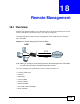



Chapter 18 Remote Management
P-660HW-Tx v3 Series User’s Guide
278
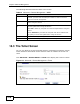
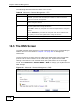
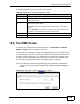
The following table describes the labels in this screen.
18.5 The DNS Screen
Use DNS (Domain Name System) to map a domain name to its corresponding IP
address and vice versa. Refer to Chapter 7 on page 119 for background
information.
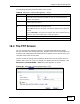
Use this screen to set from which IP address the ZyXEL Device will accept DNS
queries and on which interface it can send them your ZyXEL Device’s DNS
settings. This feature is not available when the ZyXEL Device is set to bridge
mode. Click Advanced > Remote MGMT > DNS to change your ZyXEL Device’s
DNS settings.
Figure 121 Advanced > Remote Management > DNS
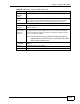
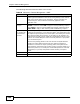
Table 83 Advanced > Remote Management > FTP
LABEL DESCRIPTION
Port You may change the server port number for a service, if needed.
However, you must use the same port number in order to use that
service for remote management.
Access Status Select the interface(s) through which a computer may access the ZyXEL
Device using this service.
Secured Client
IP
A secured client is a “trusted” computer that is allowed to communicate
with the ZyXEL Device using this service.
Select All to allow any computer to access the ZyXEL Device using this
service.
Choose Selected to just allow the computer with the IP address that
you specify to access the ZyXEL Device using this service.
Apply Click this to save your changes.
Cancel Click this to restore your previously saved settings.