
User's Manual




Chapter 18 Remote Management
P-660HW-Tx v3 Series User’s Guide
279
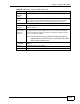
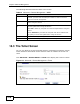
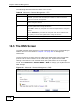
The following table describes the labels in this screen.
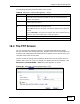
18.6 The ICMP Screen
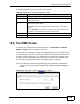
To change your ZyXEL Device’s security settings, click Advanced > Remote
MGMT > ICMP. The screen appears as shown.
If an outside user attempts to probe an unsupported port on your ZyXEL Device,
an ICMP response packet is automatically returned. This allows the outside user to
know the ZyXEL Device exists. Your ZyXEL Device supports anti-probing, which
prevents the ICMP response packet from being sent. This keeps outsiders from
discovering your ZyXEL Device when unsupported ports are probed.
Note: If you want your device to respond to pings and requests for unauthorized
services, you may also need to configure the firewall anti probing settings to
match.
Figure 122 Advanced > Remote Management > ICMP
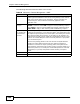
Table 84 Advanced > Remote Management > DNS
LABEL DESCRIPTION
Port The DNS service port number is 53 and cannot be changed here.
Access Status Select the interface(s) through which a computer may send DNS queries
to the ZyXEL Device.
Secured Client
IP
A secured client is a “trusted” computer that is allowed to send DNS
queries to the ZyXEL Device.
Select All to allow any computer to send DNS queries to the ZyXEL
Device.
Choose Selected to just allow the computer with the IP address that
you specify to send DNS queries to the ZyXEL Device.
Apply Click this to save your changes.
Cancel Click this to restore your previously saved settings.