
User's Manual




Chapter 19 Universal Plug-and-Play (UPnP)
P-660HW-Tx v3 Series User’s Guide
286
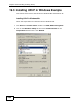
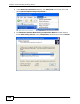
3 In the Network Connections window, click Advanced in the main menu and
select Optional Networking Components ….
Network Co nnections
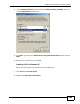
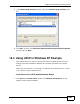
4 The Windows Optional Networking Components Wizard window displays.
Select Networking Service in the Components selection box and click Details.
Windows Optional Networking Components Wizard