
User's Manual



P-660HW-Tx v3 Series User’s Guide
29
CHAPTER 2
Introducing the Web
Configurator
2.1 Overview
The web configurator is an HTML-based management interface that allows easy
device setup and management via Internet browser. Use Internet Explorer 6.0 and
later or Netscape Navigator 7.0 and later versions. The recommended screen
resolution is 1024 by 768 pixels.
In order to use the web configurator you need to allow:
• Web browser pop-up windows from your device. Web pop-up blocking is enabled
by default in Windows XP SP (Service Pack) 2.
• JavaScript (enabled by default).
• Java permissions (enabled by default).
See Appendix B on page 375 if you need to make sure these functions are allowed
in Internet Explorer.
2.1.1 Accessing the Web Configurator
1 Make sure your ZyXEL Device hardware is properly connected (refer to the Quick
Start Guide).
2 Launch your web browser.
3 Type "192.168.1.1" as the URL.
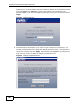
4 A password screen displays. The ZyXEL Device has a dual login system. The
default non-readable characters represents the user password (user by default).
Clicking Login without entering any password brings you to the system’s
status screen. To access the administrative web configurator and manage the