
User's Manual



Chapter 2 Introducing the Web Configurator
P-660HW-Tx v3 Series User’s Guide
30
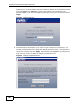
ZyXEL Device, type the admin password (1234 by default) in the password screen
and click Login. Click Cancel to revert to the default user password in the
password field. If you have changed the password, enter your password and click
Login.
Figure 3 Password Screen
5 The following screen displays if you have not yet changed your password. It is
strongly recommended you change the default password. Enter a new password,
retype it to confirm and click Apply; alternatively click Ignore to proceed to the
main menu if you do not want to change the password now.
Figure 4 Change Password Screen