
User's Manual



Chapter 21 Logs
P-660HW-Tx v3 Series User’s Guide
303
21.3 The Log Settings Screen
Use the Log Settings screen to configure the mail server, the syslog server, when
to send logs and what logs to send.
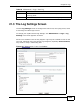
To change your ZyXEL Device’s log settings, click Maintenance > Logs > Log
Settings. The screen appears as shown.
Alerts are e-mailed as soon as they happen. Logs may be e-mailed as soon as the
log is full. Selecting many alert and/or log categories (especially Access Control)
may result in many e-mails being sent.
Figure 127 Maintenance > Logs > Log Settings
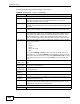
Destination This field lists the destination IP address and the port number of the
incoming packet.
Notes This field displays additional information about the log entry.
Table 89 Maintenance > Logs > View Log
LABEL DESCRIPTION