
User's Manual


Chapter 22 Tools
P-660HW-Tx v3 Series User’s Guide
326
Backup Configuration
Backup Configuration allows you to back up (save) the ZyXEL Device’s current
configuration to a file on your computer. Once your ZyXEL Device is configured
and functioning properly, it is highly recommended that you back up your
configuration file before making configuration changes. The backup configuration
file will be useful in case you need to return to your previous settings.
Click Backup to save the ZyXEL Device’s current configuration to your computer.
Restore Configuration
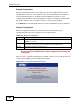
Restore Configuration allows you to upload a new or previously saved
configuration file from your computer to your ZyXEL Device.
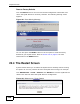
Do not turn off the ZyXEL Device while configuration file upload is
in progress.
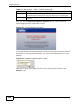
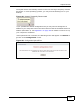
After you see a “restore configuration successful” screen, you must then wait one
minute before logging into the ZyXEL Device again.
Figure 137 Configuration Upload Successful
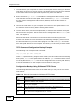
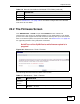
Table 112 Restore Configuration
LABEL DESCRIPTION
File Path Type in the location of the file you want to upload in this field or click
Browse ... to find it.
Browse... Click this to find the file you want to upload. Remember that you must
decompress compressed (.ZIP) files before you can upload them.
Upload Click this to begin the upload process.