
User's Manual


P-660HW-Tx v3 Series User’s Guide
329
CHAPTER 23
Diagnostic
23.1 Overview
These read-only screens display information to help you identify problems with the
ZyXEL Device.
23.1.1 What You Can Do in the Diagnostic Screens
•Use the General Diagnostic screen (Section 23.2 on page 329) to ping an IP
address.
•Use the DSL Line Diagnostic screen (Section 23.3 on page 330) to view the
DSL line statistics and reset the ADSL line.
23.2 The General Diagnostic Screen
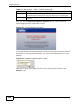
Use this screen to ping an IP address. Click Maintenance > Diagnostic to open
the screen shown next.
Figure 143 Maintenance > Diagnostic > General