
User's Manual



Chapter 2 Introducing the Web Configurator
P-660HW-Tx v3 Series User’s Guide
33
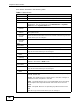
Wireless LAN AP Use this screen to configure the wireless LAN settings and WLAN
authentication/security settings.
More AP Use this screen to configure multiple BSSs on the ZyXEL Device.
WPS Use this screen to configure WPS (Wi-Fi Protected Setup)
settings.
WPS Station Use this screen to set up a WPS wireless network.
WDS Use this screen to set up Wireless Distribution System links to
other access points.
Scheduling Use this screen to configure the dates/times to enable or disable
the wireless LAN.
NAT General Use this screen to enable NAT.
Port
Forwarding
Use this screen to make your local servers visible to the outside
world.
ALG Use this screen to enable or disable SIP ALG.
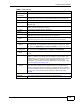
Security
Firewall General Use this screen to activate/deactivate the firewall and the default
action to take on network traffic going in specific directions.
Rules This screen shows a summary of the firewall rules, and allows you
to edit/add a firewall rule.
Threshold Use this screen to configure the thresholds for determining when
to drop sessions that do not become fully established.
Content Filter Keyword Use this screen to block access to web sites containing certain
keywords in the URL.
Schedule Use this screen to set the days and times for your device to
perform content filtering.
Trusted Use this screen to exclude a range of users on the LAN from
content filtering.
Packet Filter Use this screen to configure the rules for protocol and generic
filter sets.
Certificates Trusted CAs Use this screen to save CA certificates to the ZyXEL Device.
Advanced
Static Route Use this screen to configure IP static routes to tell your device
about networks beyond the directly connected remote nodes.
802.1Q/1P Group Setting Use this screen to activate 802.1Q/1P, specify the management
VLAN group, display the VLAN groups and configure the settings
for each VLAN group.
Port Setting Use this screen to configure the PVID and assign traffic priority for
each port.
QoS General Use this screen to enable QoS and traffic prioritizing, and
configure bandwidth management on the WAN.
Class Setup Use this screen to define a classifier.
Monitor
Use this screen to view each queue’s statistics.
Dynamic DNS This screen allows you to use a static hostname alias for a
dynamic IP address.
Table 3 Navigation Panel Summary
LINK TAB FUNCTION