
User's Manual




Appendix A Setting up Your Computer’s IP Address
P-660HW-Tx v3 Series User’s Guide
356
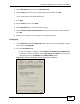
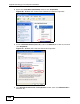
3 Right-click Local Area Connection and then click Properties.
Figure 150 Windows XP: Control Panel: Network Connections: Properties
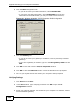
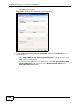
4 Select Internet Protocol (TCP/IP) (under the General tab in Win XP) and then
click Properties.
Figure 151 Windows XP: Local Area Connection Properties
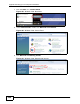
5 The Internet Protocol TCP/IP Properties window opens (the General tab in
Windows XP).