
User's Manual



Chapter 3 Status Screens
P-660HW-Tx v3 Series User’s Guide
40
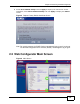
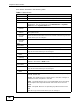
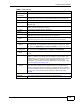
Each field is described in the following table.
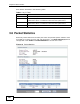
3.6 Packet Statistics
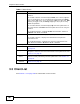
Read-only information here includes port status and packet specific statistics. Also
provided are "system up time" and "poll interval(s)". The Poll Interval(s) field is
configurable. Click Status > Packet Statistics to access this screen.
Figure 10 Packet Statistics
Table 6 Any IP Table
LABEL DESCRIPTION
# This field is a sequential value. It is not associated with a specific entry.
IP Address
This field displays the IP address of each computer that is using the
ZyXEL Device but is in a different subnet than the ZyXEL Device.
MAC Address
This field displays the MAC address of the computer that is using the
ZyXEL Device but is in a different subnet than the ZyXEL Device.
Refresh Click this to update this screen.