
User's Manual



Chapter 3 Status Screens
P-660HW-Tx v3 Series User’s Guide
41
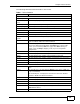
The following table describes the fields in this screen.
Table 7 Packet Statistics
LABEL DESCRIPTION
System Monitor
System up Time This is the elapsed time the system has been up.
Current Date/
Time
This field displays your ZyXEL Device’s present date and time.
CPU Usage This field specifies the percentage of CPU utilization.
Memory Usage This field specifies the percentage of memory utilization.
WAN Port Statistics
Link Status This is the status of your WAN link.
WAN IP Address This is the IP address of the ZyXEL Device’s WAN port.
Upstream Speed This is the upstream speed of your ZyXEL Device.
Downstream
Speed
This is the downstream speed of your ZyXEL Device.
Node-Link This field displays the remote node index number and link type. Link
types are PPPoA, ENET, RFC 1483 and PPPoE.
Status This field displays Down (line is down), Up (line is up or connected) if
you're using Ethernet encapsulation and Down (line is down), Up
(line is up or connected), Idle (line (ppp) idle), Dial (starting to
trigger a call) and Drop (dropping a call) if you're using PPPoE
encapsulation.
TxPkts This field displays the number of packets transmitted on this port.
RxPkts This field displays the number of packets received on this port.
Errors This field displays the number of error packets on this port.
Tx B/s This field displays the number of bytes transmitted in the last second.
Rx B/s This field displays the number of bytes received in the last second.
Up Time This field displays the elapsed time this port has been up.
LAN Port Statistics
Interface This field displays either Ethernet (LAN ports) or Wireless (WLAN
port).
Status For the LAN ports, this field displays Down (line is down) or Up (line
is up or connected).
For the WLAN port, it displays the transmission rate when WLAN is
enabled or N/A when WLAN is disabled.
TxPkts This field displays the number of packets transmitted on this interface.
RxPkts This field displays the number of packets received on this interface.
Collisions This is the number of collisions on this interfaces.
Poll Interval(s) Type the time interval for the browser to refresh system statistics.
Set Interval Click this to apply the new poll interval you entered in the Poll
Interval field above.
Stop Click this to halt the refreshing of the system statistics.