
User's Manual




P-660HW-Tx v3 Series User’s Guide
43
CHAPTER 4
Tutorials
4.1 Overview
This chapter shows you how to use the ZyXEL Device’s various features.
• Setting Up a Secure Wireless Network, see page 43
• Setting Up Multiple Wireless Groups, see page 52
• Configuring the MAC Address Filter, see page 56
• Setting Up NAT Port Forwarding, see page 58
• Access the ZyXEL Device Using DDNS, see page 61
• Configuring Static Route for Routing to Another Network, see page 65
• Multiple Public and Private IP Address Mappings, see page 67
• Multiple WAN Connections Example, see page 71
• Multiple PVCs with QoS, see page 72
4.2 Setting Up a Secure Wireless Network
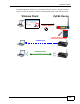
Thomas wants to set up a wireless network so that he can use his notebook to
access the Internet. In this wireless network, the ZyXEL Device serves as an
access point (AP), and the notebook is the wireless client. The wireless client can
access the Internet through the AP.
Thomas has to configure the wireless network settings on the ZyXEL Device. Then
he can set up a wireless network using WPS (Section 4.2.2 on page 45) or manual
configuration (Section 4.2.3 on page 50).