
User's Manual



Chapter 4 Tutorials
P-660HW-Tx v3 Series User’s Guide
44
4.2.1 Configuring the Wireless Network Settings
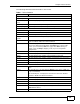
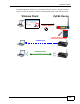
This example uses the following parameters to set up a wireless network.
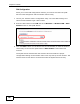
1 Click Network > Wireless LAN to open the AP screen. Configure the screen
using the provided parameters (see page 44). Click Apply.
SSID Example
Security Mode WPA-PSK
Pre-Shared Key DoNotStealMyWirelessNetwork
802.11 Mode Mixed