
User's Manual


Chapter 4 Tutorials
P-660HW-Tx v3 Series User’s Guide
52
4.3 Setting Up Multiple Wireless Groups
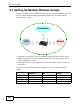
Company A wants to create different wireless network groups for different types of
users as shown in the following figure. Each group has its own SSID, security
mode and QoS control.
• Employees in Company A will use a general Company wireless network group.
• Higher management level and important visitors will use the VIP group, which
has the highest QoS control.
• Visiting guests will use the Guest group, which has a lower security mode and
QoS control.
Company A will use the following parameters to set up the wireless network
groups.
COMPANY VIP GUEST
SSID Company VIP Guest
Security Mode WPA2-PSK WPA2-PSK Static WEP
Pre-Shared Key ForCompanyOnly ForVIPOnly Guest
QoS Default High Low
Company
VIP
Guest