
User's Manual


Chapter 4 Tutorials
P-660HW-Tx v3 Series User’s Guide
53
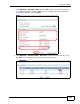
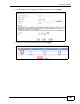
1 Click Network > Wireless LAN to open the AP screen. Use this screen to set up
the company’s general wireless network group. Configure the screen using the
provided parameters and click Apply.
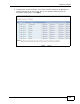
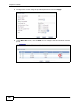
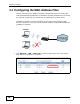
2 Click Network > Wireless LAN > More AP to open the following screen. Click
the Edit icon to configure the second wireless network group.