
User's Manual


Chapter 4 Tutorials
P-660HW-Tx v3 Series User’s Guide
57
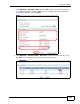
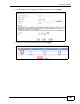
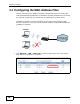
2 Click Network > Wireless LAN to open the AP screen. Click the Edit button in
the MAC Filter field.
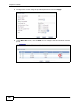
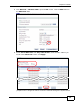
3 Select Active MAC Filter and Deny Filter Action. Enter the MAC address you
found in the Client List screen. Click Apply.
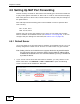
Josephine will no longer be able to access the Internet through the ZyXEL Device.