
User's Manual


Chapter 4 Tutorials
P-660HW-Tx v3 Series User’s Guide
59
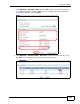
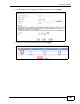
2 Click Network > NAT to open the General screen. Select Active Network
Address Translation and SUA Only. Click Apply.
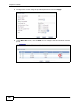
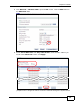
3 Click Network > NAT to open the General screen. Enter the Xbox 360’s IP
address in the Default Server field. Click Apply.
4.5.2 Port Forwarding
If the default server is already assigned to another server, configure the ports for
Xbox 360.
1 Click Network > NAT to open the General screen. Select Active Network
Address Translation and SUA Only. Click Apply.