
User's Manual




Chapter 4 Tutorials
P-660HW-Tx v3 Series User’s Guide
61
Thomas can then connect his Xbox 360 to the Internet and play online games with
his friends.
In this tutorial, all port 80 traffic is forwarded to Xbox 360, but port 80 is also the
default listening port for remote management via WWW. If Thomas also wants to
manage the ZyXEL Device from the Internet, he has to assign an unused port to
WWW remote access.
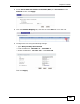
Click Advanced > Remote MGMT to open the WWW screen. Enter an unused
port in the Port field (this example uses 81). Click Apply.
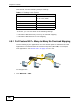
4.6 Access the ZyXEL Device Using DDNS
If you connect your ZyXEL Device to the Internet and it uses a dynamic WAN IP
address, it is inconvenient for you to manage the device from the Internet. The
ZyXEL Device’s WAN IP address changes dynamically. Dynamic DNS (DDNS)
allows you to access the ZyXEL Device using a domain name.
To use this feature, you have to apply for DDNS service at www.dyndns.org.
This tutorial shows you how to:
• Registering a DDNS Account on www.dyndns.org
• Configuring DDNS on Your ZyXEL Device
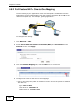
w.x.y.z
a.b.c.d
http://zyxelrouter.dyndns.org
A