
User's Manual




Chapter 4 Tutorials
P-660HW-Tx v3 Series User’s Guide
65
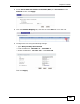
3 The ZyXEL Device’s login page should appear. You can then log into the ZyXEL
Device and manage it.
4.7 Configuring Static Route for Routing to
Another Network
In order to extend your Intranet and control traffic flowing directions, you may
connect a router to the ZyXEL Device’s LAN. The router may be used to separate
two department networks. This tutorial shows how to configure a static routing
rule for two network routings.
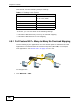
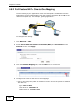
In the following figure, router R is connected to the ZyXEL Device’s LAN. R
connects to two networks, N1 (192.168.1.x/24) and N2 (192.168.10.x/24). If
you want to send traffic from computer A (in N1 network) to computer B (in N2
network), the traffic is sent to the ZyXEL Device’s WAN default gateway by
default. In this case, B will never receive the traffic.
N2
B
N1
A
R