
User's Manual




Chapter 4 Tutorials
P-660HW-Tx v3 Series User’s Guide
66
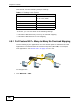
You need to specify a static routing rule on the ZyXEL Device to specify R as the
router in charge of forwarding traffic to N2. In this case, the ZyXEL Device routes
traffic from A to R and then R routes the traffic to B.
This tutorial uses the following example IP settings:
To configure a static route to route traffic from N1 to N2:
1 Log into the ZyXEL Device’s Web Configurator in advanced mode.
2 Click Advanced > Static Route.
3 Click Edit on a new rule in the Static Route screen.
Table 8 IP Settings in this Tutorial
DEVICE / COMPUTER IP ADDRESS
The ZyXEL Device’s WAN 172.16.1.1
The ZyXEL Device’s LAN 192.168.1.1
A 192.168.1.34
R’s N1 192.168.1.253
R’s N2 192.168.10.2
B 192.168.10.33
N2
B
N1
A
R