
User's Manual




Chapter 4 Tutorials
P-660HW-Tx v3 Series User’s Guide
67
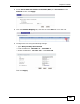
4 Configure the Static Route Setup screen using the following settings:
4a Select Active.
4b Specify a descriptive name for this routing rule.
4c Type 192.168.10.0 and subnet mask 255.255.255.0 for the destination,
N2.
4d Select Gateway Address for the gateway type.
4e Type 192.168.1.253 (R’s N1 address) in the Gateway IP Address field.
4a Click Apply.
Now B should be able to receive traffic from A. You may need to additionally
configure B’s firewall settings to allow specific traffic to pass through.
4.8 Multiple Public and Private IP Address
Mappings
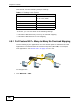
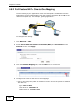
If your ISP gives you more than one static IP address for your Internet access,
you can map each IP address for a specific service. This tutorial assumes you are
given two static public IP addresses. You want to map them to two servers A and
B.
A
B
IP-1
IP-2
C