
User's Manual




Chapter 4 Tutorials
P-660HW-Tx v3 Series User’s Guide
68
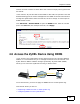
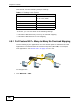
This tutorial uses the following example settings:
To do this, you can use either of the following settings:
• Full Feature NAT with many-to-many no overload mapping
• Full Feature NAT with one-to-one mapping
4.8.1 Full Feature NAT + Many-to-Many No Overload Mapping
Use this setting if your applications can use random public IP addresses and the
applications are initiated from the Intranet computers (A and B). For example,
VoIP application. See Section 4.8.2 on page 70 if it is not.
To configure this:
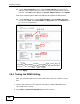
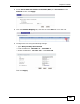
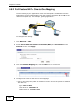
1 Click Network > NAT.
Table 9 IP Settings in this Tutorial
DEVICE / COMPUTER IP ADDRESS
The ZyXEL Device’s WAN 172.16.1.253 (IP-1)
172.16.1.254 (IP-2)
The ZyXEL Device’s LAN 192.168.1.1
A 192.168.1.2
B 192.168.1.3
C a.b.c.d
A
B
IP-1
C
1
2