
User's Manual


Chapter 4 Tutorials
P-660HW-Tx v3 Series User’s Guide
73
4.10.1 Configuring Multiple PVCs and ATM-QoS
This section shows you how to configure two PVCs and specify a proper ATM-QoS
type for each PVC.
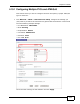
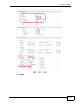
1 Click Network > WAN > Internet Access Setup, configure the settings you
(ISP) want to provide to the subscriber for general data transmission. This tutorial
uses the following example settings:
• Line Modulation: Multi Mode
•Mode: Routing
•Encapsulation: PPPoE
•User Name: PPPoEuser1
• Password: 1234
•PVC: LLC, 0/35
Leave the other settings as their defaults and click Apply.