
User's Manual




Chapter 5 Internet and Wireless Setup Wizard
P-660HW-Tx v3 Series User’s Guide
85
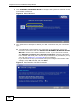
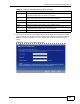
3b The following screen displays if a PPPoE or PPPoA connection is detected.
Enter your Internet account information (username, password and/or service
name) exactly as provided by your ISP. Then click Next and see Section 5.3 on
page 92 for wireless connection wizard setup.
Figure 15 Auto-Detection: PPPoE
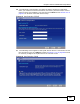
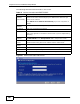
3c The following screen appears if the ZyXEL device detects a connection but not
the connection type. Click Next and refer to Section 5.2.1 on page 86 on how
to manually configure the ZyXEL Device for Internet access.
Figure 16 Auto Detection: Failed