
User's Manual



Chapter 15 IPSec VPN
NBG-460N User’s Guide
198
15.4 The General Screen
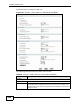
Click Security > VPN to display the Summary screen. This is a read-only menu
of your VPN rules (tunnels). Edit a VPN rule by clicking the Edit icon.
Figure 130 Security > VPN > General
The following table describes the fields in this screen.
Table 67 Security > VPN > General
LABEL DESCRIPTION
# This is the VPN policy index number.
Active This field displays whether the VPN policy is active or not.
This icon is turned on when the rule is enabled.
Local Addr. This displays the beginning and ending (static) IP addresses or a (static)
IP address and a subnet mask of computer(s) on your local network
behind your NBG-460N.
Remote Addr. This displays the beginning and ending (static) IP addresses or a (static)
IP address and a subnet mask of computer(s) on the remote network
behind the remote IPSec router.
This field displays 0.0.0.0 when the Secure Gateway Address field
displays 0.0.0.0. In this case only the remote IPSec router can initiate
the VPN.
Encap. This field displays Tunnel or Transport mode (Tunnel is the default
selection).
Algorithm This field displays the security protocol, encryption algorithm and
authentication algorithm used for an SA.
Gateway This is the static WAN IP address or URL of the remote IPSec router. This
field displays 0.0.0.0 when you configure the Secure Gateway Address
field in the Rule Setup screen to 0.0.0.0.
Modify Click the Edit icon to go to the screen where you can edit the VPN rule.
Click the Remove icon to remove an existing VPN rule.