
User's Manual





Chapter 15 IPSec VPN
NBG-460N User’s Guide
204
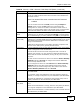
Peer Content The configuration of the peer content depends on the peer ID type.
For IP, type the IP address of the computer with which you will make
the VPN connection. If you configure this field to 0.0.0.0 or leave it
blank, the NBG-460N will use the address in the Secure Gateway
Address field (refer to the Secure Gateway Address field
description).
For Domain Name or E-mail, type a domain name or e-mail address
by which to identify the remote IPSec router. Use up to 31 ASCII
characters including spaces, although trailing spaces are truncated.
The domain name or e-mail address is for identification purposes only
and can be any string.
It is recommended that you type an IP address other than 0.0.0.0 or
use the Domain Name or E-mail ID type in the following situations:
• When there is a NAT router between the two IPSec routers.
• When you want the NBG-460N to distinguish between VPN
connection requests that come in from remote IPSec routers with
dynamic WAN IP addresses.
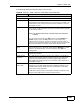
IPSec Algorithm
Encapsulation
Mode
Select Tunnel mode or Transport mode from the drop-down list box.
IPSec Protocol Select the security protocols used for an SA.
Both AH and ESP increase processing requirements and
communications latency (delay).
If you select ESP here, you must select options from the Encryption
Algorithm and Authentication Algorithm fields (described below).
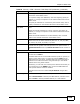
Pre-Shared Key Type your pre-shared key in this field. A pre-shared key identifies a
communicating party during a phase 1 IKE negotiation. It is called
"pre-shared" because you have to share it with another party before
you can communicate with them over a secure connection.
Type from 8 to 31 case-sensitive ASCII characters or from 16 to 62
hexadecimal ("0-9", "A-F") characters. You must precede a
hexadecimal key with a "0x” (zero x), which is not counted as part of
the 16 to 62 character range for the key. For example, in
"0x0123456789ABCDEF", “0x” denotes that the key is hexadecimal
and “0123456789ABCDEF” is the key itself.
Both ends of the VPN tunnel must use the same pre-shared key. You
will receive a “PYLD_MALFORMED” (payload malformed) packet if the
same pre-shared key is not used on both ends.
Table 68 Security > VPN > General > Rule Setup: IKE (Basic) (continued)
LABEL DESCRIPTION