
User's Manual





Chapter 15 IPSec VPN
NBG-460N User’s Guide
205
15.4.2 VPN Rule Setup (Advanced)
Click the Advanced... button in the Rule Setup screen to open this screen.
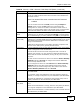
Encryption
Algorithm
Select which key size and encryption algorithm to use for data
communications. Choices are:
DES - a 56-bit key with the DES encryption algorithm
3DES - a 168-bit key with the DES encryption algorithm
The NBG-460N and the remote IPSec router must use the same
algorithms and key , which can be used to encrypt and decrypt the
message or to generate and verify a message authentication code.
Longer keys require more processing power, resulting in increased
latency and decreased throughput.
Authentication
Algorithm
Select which hash algorithm to use to authenticate packet data.
Choices are SHA1 and MD5. SHA1 is generally considered stronger
than MD5, but it is also slower.
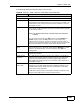
Advanced... Click Advanced... to configure more detailed settings of your IKE key
management.
Apply Click Apply to save your changes back to the NBG-460N.
Reset Click Reset to begin configuring this screen afresh.
Cancel Click Cancel to exit the screen without making any changes.
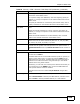
Table 68 Security > VPN > General > Rule Setup: IKE (Basic) (continued)
LABEL DESCRIPTION