
User's Manual






Chapter 17 Bandwidth Management
NBG-460N User’s Guide
237
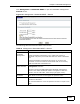
Click Management > Bandwidth MGMT to open the bandwidth management
General screen.
Figure 147 Management > Bandwidth MGMT > General
The following table describes the labels in this screen.
Table 76 Management > Bandwidth MGMT > General
LABEL DESCRIPTION
Enable
Bandwidth
Management
Select this to have the NBG-460N apply bandwidth management.
Enable bandwidth management to give traffic that matches a
bandwidth rule priority over traffic that does not match a bandwidth
rule.
Enabling bandwidth management also allows you to control the
maximum or minimum amounts of bandwidth that can be used by
traffic that matches a bandwidth rule.
Enable Automatic
Traffic Classifier
This field is only applicable when you select the Enable Bandwidth
Management check box.
Select this to have the NBG-460N apply bandwidth management
based on the default bandwidth classes. This applies to Real-time
packets, such as VoIP traffic, which always get higher priority.
Management
Bandwidth
Enter the allowed bandwidth for the LAN, WAN or WLAN interface
fields below to enhance the throughput of upstream traffic.
LAN Bandwidth Enter the amount of bandwidth in Mbps (2 to 100) that you want to
allocate for LAN traffic.
The recommendation is to set this speed to less than or equal to 100
Mbps.