
User's Manual






Chapter 17 Bandwidth Management
NBG-460N User’s Guide
238
17.5 Advanced Configuration
Use this screen to configure bandwidth management rules for the pre-defined
services or applications.
You can also use this screen to configure bandwidth management rule for other
services or applications that are not on the pre-defined list of NBG-460N.
Additionally, you can define the source and destination IP addresses and port for a
service or application.
The two tables shown in this screen can be configured and applied at the same
time.
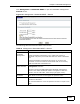
WAN Bandwidth Enter the amount of bandwidth in Mbps (2 to 100) that you want to
allocate for WAN traffic.
The recommendation is to set this speed to be equal to or less than
the speed of the broadband device connected to the WAN port. For
example, set the speed to 10 Mbps (or less) if the broadband device
connected to the WAN port has an upstream speed of 10 Mbps.
WLAN Bandwidth Enter the amount of bandwidth in Mbps (2 to 100,000) that you want
to allocate for WLAN traffic.
The recommendation is to set this speed to be less than or equal to 54
Mbps.
Apply Click Apply to save your customized settings.
Reset Click Reset to begin configuring this screen afresh.
Table 76 Management > Bandwidth MGMT > General
LABEL DESCRIPTION