
User's Manual




Chapter 19 Universal Plug-and-Play (UPnP)
NBG-460N User’s Guide
257
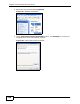
4 You may edit or delete the port mappings or click Add to manually add port
mappings.
Figure 159 Internet Connection Properties: Advanced Settings
Figure 160 Internet Connection Properties: Advanced Settings: Add
Note: When the UPnP-enabled device is disconnected from your computer, all port
mappings will be deleted automatically.
5 Select Show icon in notification area when connected option and click OK.
An icon displays in the system tray.
Figure 161 System Tray Icon